Buy me a DrinkEther Coffee (5$)
Chaos Engineering Exploration: Containerization and Test Cluster Deployment
Published on:
2024-05-12
#containerization #docker #WebDevelopment #django #vuejs #vutify3 #drf
Table of Contents
1. Containerization: A Step Towards Portability
Containerization was a crucial step in this project, ensuring the application could run consistently across different environments.
How Was It Done ?
Dockerization of Backend
- Created a Dockerfile for the Django application.
- Defined environment variables for database connections and Azure Key Vault secrets.
- Published the image to Docker Hub for easy access, you can find it here .
Dockerization of Frontend
- Built a Vue.js production-ready image using Node.js.
- Customized the image for Nginx to serve the static files.
- Published the image to Docker Hub for easy access, you can find it here .
Database Setup
- Included PostgreSQL in the containerized stack.
- Configured persistent storage and secure credentials.
Docker Compose
- Integrated all services (frontend, backend, PostgreSQL) using a docker-compose.yml file.
- Simplified running the entire stack locally for testing.
Challenges and Solutions
- Challenge: Managing configurations for multiple environments (local, test, production).
- Solution: Used .env files and Docker Compose to handle environment-specific variables.
- Challenge: Reducing the size of Docker images for faster builds and deployments.
- Solution: Leveraged multi-stage builds in the Dockerfiles as well as the use of minimal base images.
- Challenge: Encountering difficulties in finding Virtual Machines with x64 processors for AKS nodes.
- Solution: Changed the base images in Dockerfiles to arm64 instead of amd64.
Please consult the github repository of the project here to have a look at the actual definitions of the Dockerfiles.
2. Deployment on a Dev/Test Kubernetes Cluster
Why Deploying on a Dev/Test Cluster?
- Development: The application's final feature, requiring a running Kubernetes cluster, can be developed and tested locally.
- Testing: The application can be tested in a controlled environment before deploying it to production.
- Validation: The application can be validated for functionality and security before going live.
- Scalability: The application can be tested for scalability and performance.
How Was It Done ?
Kubernetes Setup
- The Dev/Test cluster was created on local ubuntu machines.
- The cluster was configured with a single control plane node and two worker nodes.
- The Kubernetes cluster was deployed the kubeadm way.
- More details on the setup can be found in the official documentation (here).
Manifests
The Kubernetes manifests are those in the folder k8s_manifests of the repository. The manifests include the following YAML files:
- django-service-deployment.yaml: manifest containing the definitions for the Deployment, Service (primarily NodePort), Secrets and HPA.
- vuejs-service-deployment.yaml: manifest containing the definitions for the Deployment, Service (primarily NodePort) and HPA.
- postgresql-service-deployment.yaml: manifest containing the definitions for the PV, PVC, Secrets, Deployment, Service (primarily NodePort) and HPA.
- pgadmin-service.yaml.old: dev/test ONLY manifest containing the definitions for the Deployment, Service and HPA.
Up and Running
- The manifests were deployed on the test cluster using kubectl apply -f
. - The deployments were validated by accessing the services using the NodePorts.
3. Development & Deployment of the Feature 'File Management'
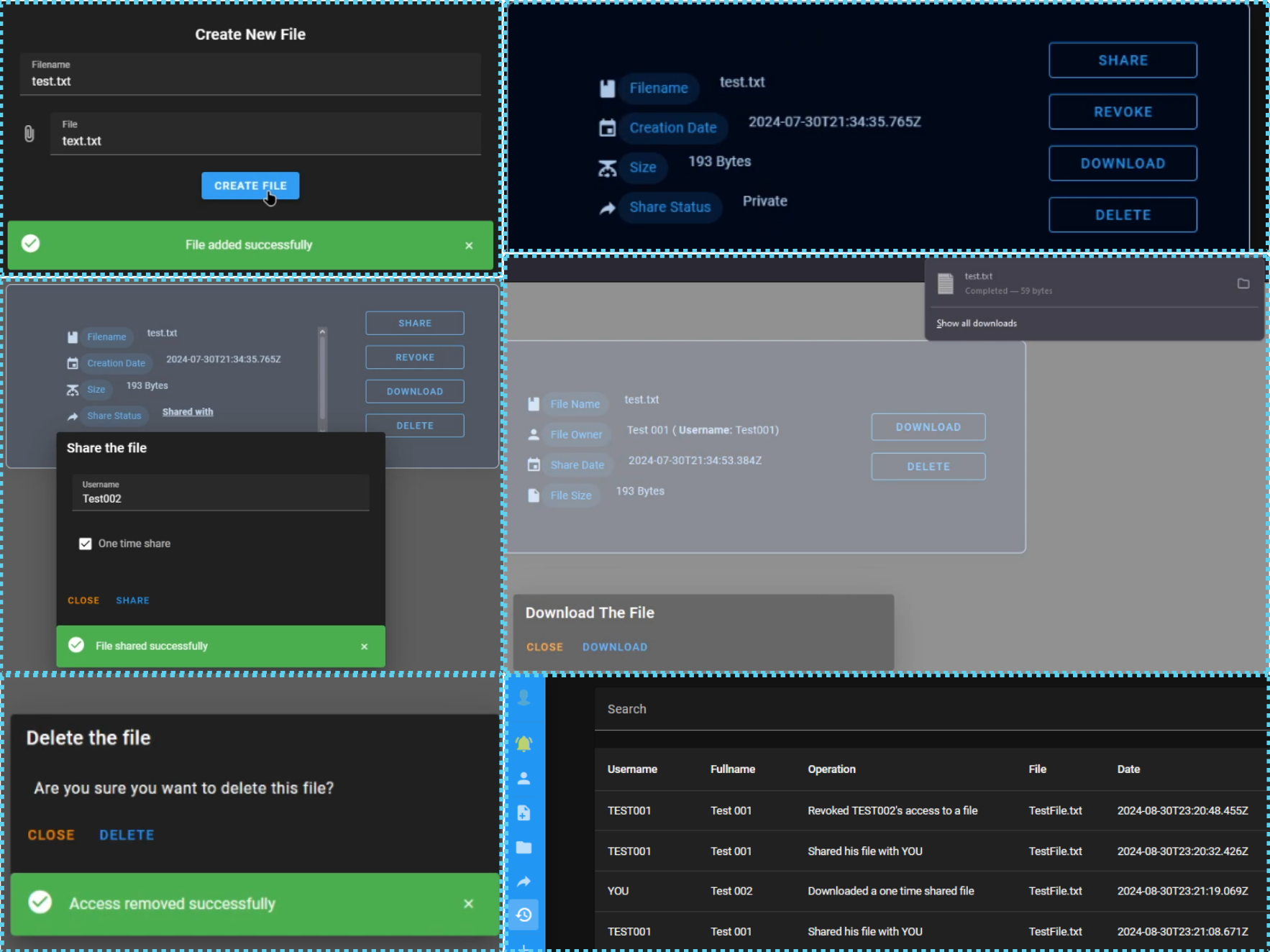
The File Management feature encompasses the creation, deletion, retrieval, share and revocation of the files. This feature specifically required the creation of an additional backend API (made with Flask) to interact with the Kube API server for the creation of Pod/PV couples for storing the files.
PS: The use of Pod/PV couples for storing the files was decided to be suitable for the project instead of using a different service ready for storing files (like S3), since it offers a more 'from-scratchy' approach and allows for a better understanding of the Kubernetes ecosystem and better chaos testing at the later stage of the project. (I know this is LAME, am just experimenting to learn more about Kubernetes and its ecosystem).
Frontend UIs for the File Management Feature
Backend APIs for the File Management Feature
The following table documents the endpoints of the back-end API that are relevent to the File Management feature.
- django_api:8000 is the internal IP(Domain Name)/PORT of the Django API Kubernetes service.
- kubemanager:1999 is the internal IP(Domain Name)/PORT of the KubeManager Kubernetes service.
| Endpoint | Method | Description |
|---|---|---|
| django-api:8000/api/add_file | POST | Receives two parameters (filename & File) to create a new instance of the class File. |
| kubemanager:1999/upload_file | POST | Receives the file along with the owner's username to store in a K8S Persistent Volume. |
| django-api:8000/api/list_files | GET | Fetches all the files (just the metadata not the actual files) owned by the current user. |
| django-api:8000/api/share_file | POST | Creates a share object for a specific user with optional expiration parameters. |
| django-api:8000/api/revoke_file | POST | Deletes a share object of a file for a specific user. |
| django-api:8000/api/download_file | GET | Requests the file. Involves a call to the kubemanager service to retrieve the file from the K8S Persistent Volume. |
| django-api:8000/api/delete_file | POST | Deletes a file along with all the shares that have been created from it (revoking all access to it). This also invokes a call to the kubemanager service to delete the file from the K8S Persistent Volume. |
| kubemanager:1999/get_file | GET | Gets the file from the K8S Persistent Volume. |
| kubemanager:1999/delete_file | POST | Deletes the file from the K8S Persistent Volume. |
Containerization & Deployment on a Dev/Test Kubernetes Cluster
Containerization of the Application
- The same way as the previously dockerized images, the Dockerfiles of the django and VueJS applications were updated to include the changes of the UIs and the new Django API endpoints.
- A new Dockerfile was created for the KubeManager service, which was used to interact with the Kubernetes API server to store the files.
- Theimage of the KubeManager service is pushed to the Docker Hub and you can find it here.
Deployment on a Dev/Test Kubernetes Cluster
The Kubernetes manifest is in the folder k8s_manifests of the repository. Specifically, the file k8s_manifests/kube-manager.yaml is the manifest that defines all the resources that are needed to run the KubeManager service.
- ServiceAccount: The service account is used to grant the KubeManager access to the Kubernetes API server.
- Secret: The secret is used to store the Secret Account Token of the Kubernetes API server.
- Role/RoleBinding: The role and role binding are used to grant the KubeManager permission to manage Pods craetion and mounting of PVs in them.
- ClusterRole/ClusterRoleBinding: The cluster role and cluster role binding are used to grant the KubeManager permission to manage PVs/PVCs, which is not possible with a regular role/role binding since they are cluster-wide resources.
- Deployment: The deployment is used to run the KubeManager API service.
- Service: The service is used to expose the KubeManager API service internally.
- HPA: The horizontal pod autoscaler is used to automatically scale the number of replicas of the KubeManager API service based on the CPU usage of the pods.
4. Final Dev/Test Kubernetes Cluster Architecture
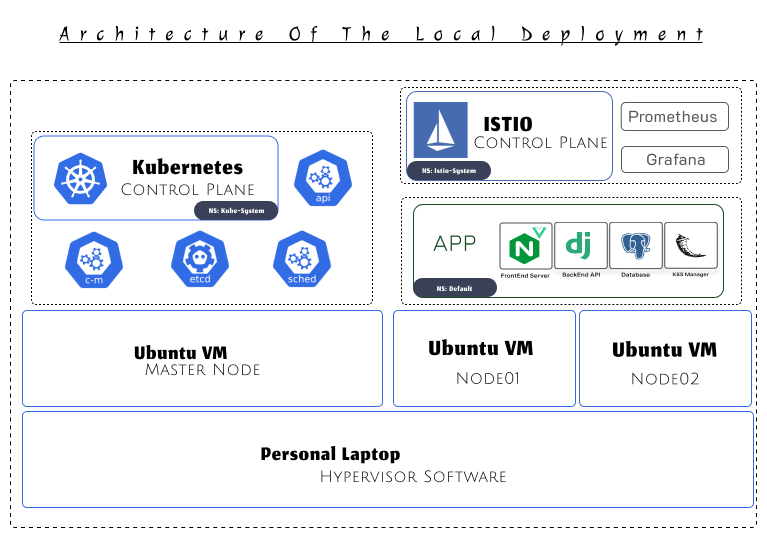
The final architecture of the Dev/Test Kubernetes cluster is shown in the image above. As you can see, there are some elements of the architecture that we did not cover in these posts, such as the Istio service mesh and the monitoring services. Those elements have been set up via the use of Helm charts.
5. What's Next?
Now that the Dev/Test Kubernetes cluster is up and running, the next step involves setting up Azure Services and deploying the application to the production cluster. Read about it in here.